How your friends join your Minecraft server
The most common question after making a server is the simplest one: how do my friends actually get in? Here's the whole thing: sharing the address, Bedrock cross-play, and why 'connection refused' happens.
You made a server, you're standing in it, and your friends are in the group chat typing "it says connection refused." This is the single most-asked setup question, on every host. The box is the easy part; getting your friends in is the wall.
It comes down to three things: sharing the right address, matching versions, and (if anyone's on a phone or console) cross-play. Here's each one.
In this guide
2Add the server in Minecraft
Adding a server on Java Edition is four clicks, and you only do it once. After that it sits in your Multiplayer list.
On Bedrock (phone, tablet, Windows) it's the Servers tab instead of Multiplayer, and you enter the address and the Bedrock port, 19132, as two separate fields. Consoles are the awkward exception; see the cross-play section below.
Open Minecraft and press Multiplayer on the title screen.
Press Add Server, paste the address into Server Address, and give it any name you like.
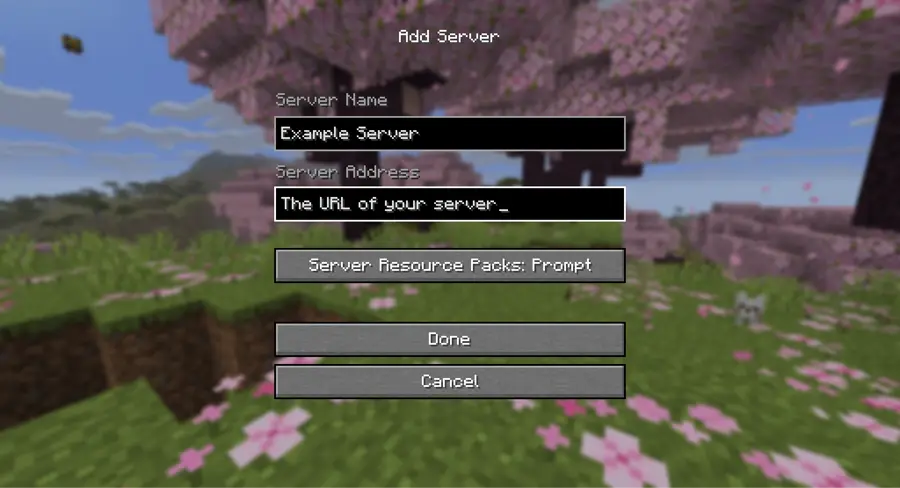
Press Done. The server appears in the list with a connection bar beside it.
Select it and press Join Server. If the bar shows a red X, hover it: Minecraft usually names the problem there before you even try.
The catch
Everyone's Minecraft version has to match the server's. A mismatch is the single most common reason one friend is in and another isn't, and the error it produces ("Outdated client" or "Outdated server") names which side is wrong. Read it before changing anything else.
3Fix 'connection refused' or 'can't connect'
A 'connection refused' error is almost always one of four things, and they're worth checking in this order: the first two account for most of them.
On a hosted server there's no router to configure, so if it's running and the address is spelled right, your friends are in. On Voxi the world wakes by itself when someone joins, and if a server has actually stopped we say so rather than showing a green light we can't back. Two honest limits on that: the wake isn't instant (it's a server booting, same as any other), and a world without a Pro plan waits for a free slot if the shared pool is busy, with your place in line shown.
Is it actually running? A stopped or sleeping world refuses connections exactly like a wrong address does.
Read the address back character by character. A missing letter and a dead server look identical from the other end.
Compare versions. The joining player's Minecraft version has to match the server's, down to the patch.
Check the edition. A Bedrock player typing a Java address into the Servers tab gets a connection error, not a helpful one. That's the cross-play section below, not a broken server.
The catch
If the server is on your own PC, none of the above is the likely cause: it's the router. That's its own section at the bottom of this page, and it's the one case where fixing this properly means changing settings outside Minecraft.
4Get Bedrock and phone friends in (cross-play)
Java and Bedrock are two different games that don't share servers. A bridge called Geyser translates Bedrock players (on phones, tablets, consoles, and Windows) onto a Java server, and a companion called Floodgate lets them in without buying a Java account.
On Voxi it's a switch in Players called "Let Bedrock players join". It shows up once your world has booted the first time, and it needs a full stop and start to take. Your Bedrock friends then add the same address the Java players use, with the Bedrock port, 19132, in its own field. What turning it on does not buy you is a different Geyser: the things Geyser can't translate (Java-only mods, custom UIs) it still can't translate here.
The catch
Consoles are the genuinely hard case. Xbox, PlayStation and Switch only list Minecraft's own featured servers, so a console friend can't simply type your address in. Getting them on takes a workaround, and on some setups it isn't possible at all. Phones, tablets and Windows have no such restriction.
5If it's a server on your own PC (port forwarding)
Best for: Someone with a spare machine who doesn't mind router settings: it costs nothing but electricity.Not for: A group who want to be playing tonight, or anyone who'd rather not hand their home IP to a group chat.Hosting from your own computer means forwarding a port on your router to your PC, keeping that PC on whenever friends want to play, and sharing your public IP.
It's genuinely the cheapest way to do this, and if you like the tinkering it's a good hobby. The friction is real though: it exposes your home IP, it breaks whenever that IP changes, and on a lot of home connections it can't work at all: if your provider puts you behind carrier-grade NAT, no amount of router configuration will open a port, and you need a tunnel like playit.gg or Tailscale instead.
The catch
The PC hosting it has to stay on and awake for anyone to play, which is the same catch as opening a world to LAN. You've just made it reachable from further away.
FAQ
Why does it say 'connection refused'?
Usually the server isn't running, the address has a typo, or your Minecraft version doesn't match the server's. On a hosted server there's no router setup to blame.
Can Bedrock or phone players join a Java server?
Yes, through a bridge called Geyser. On Voxi it's a switch you turn on once your world has booted; on many hosts you set Geyser up yourself first.
Do I need to port forward?
Only if you host on your own PC. A hosted server gives you a shareable address with no router changes at all. And if your provider puts you behind carrier-grade NAT, port forwarding can't work even on your own PC. A tunnel is the way round it.
Can my friend on an Xbox or PlayStation join?
Not by typing the address in. Consoles only list Minecraft's featured servers, so joining a server of your own takes a workaround and sometimes isn't possible at all. Phones, tablets and Windows Bedrock players can add your address directly.
Read next: how to play Minecraft with friends.
Comparing hosts? See how Voxi compares to Aternos, Minehut, Exaroton and the paid hosts.
Share one address, and they're in
Start a free server on Voxi, copy the Java Edition address, and send the link. Turn on cross-play for Bedrock and phone friends. No port forwarding.